
Thursday, April 4, 2013
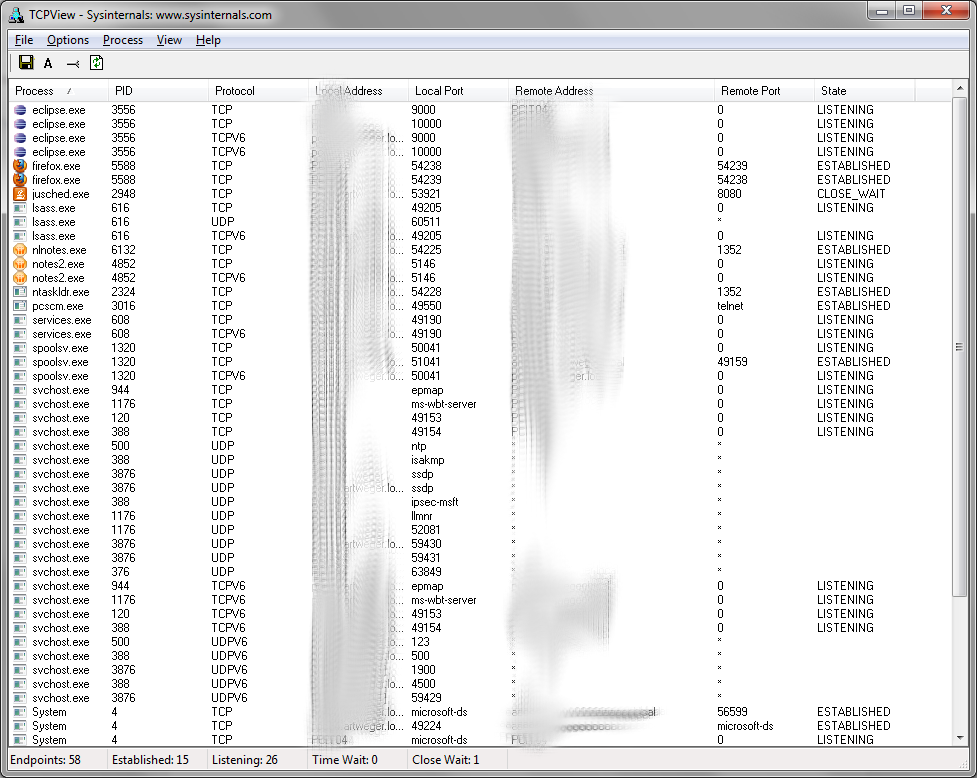
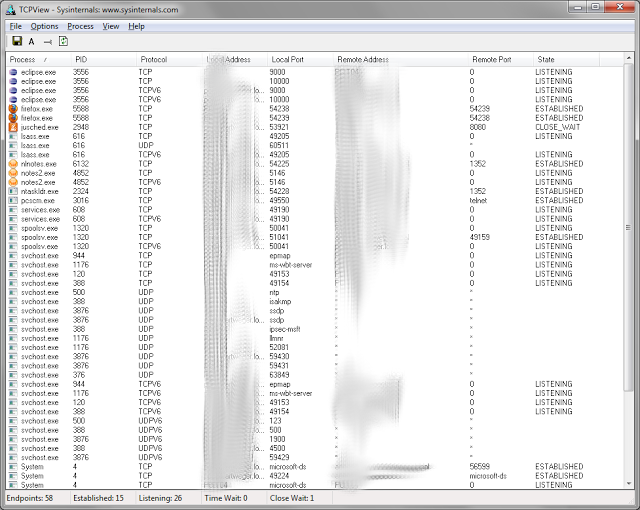
Cool tool to analyze TCP Port activity
Windows has a command line tool to monitor which ports are used by which process called "netstat". But this tool is not very easy to use and on some operations very slow. But fortunatetly the genius guys from Sysinternals provide the great tool TCPView for this task. With this tool you see a overview of all used tcp ports and their status. So for example you can easily find out which process listens on which ports. You can even kill processes to free the ports in this tool.
Tuesday, April 2, 2013
IBM website does not render properly in Firefox with Hardware Acceleration enabled
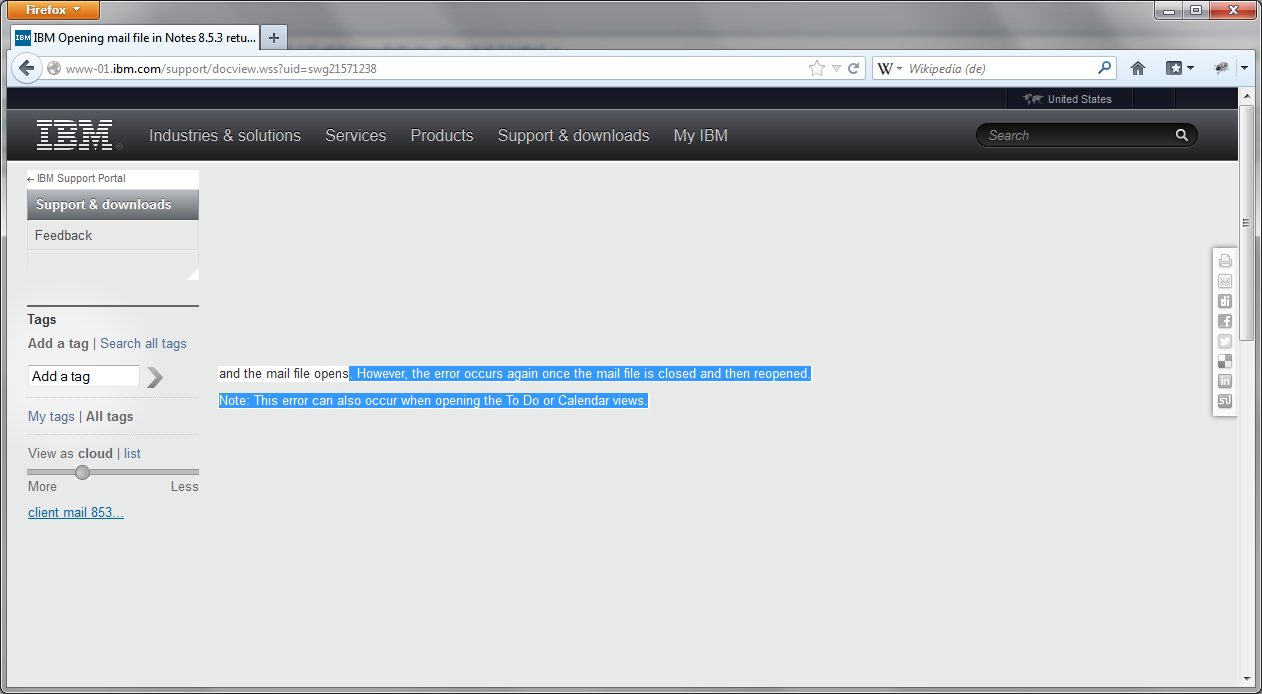
Newer Firefox (e.g. the newest ESR) versions can not render the IBM support website correctly. Many parts of the website are invisible and will show only sporadic on scrolling.
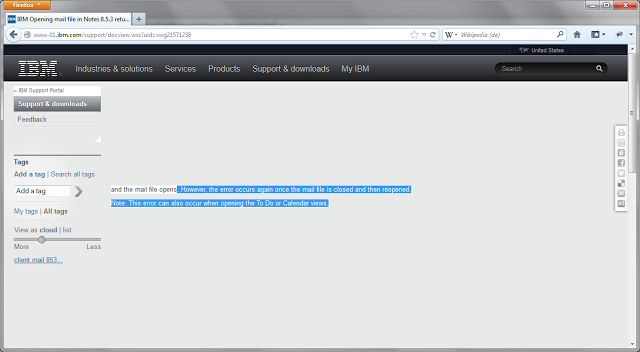
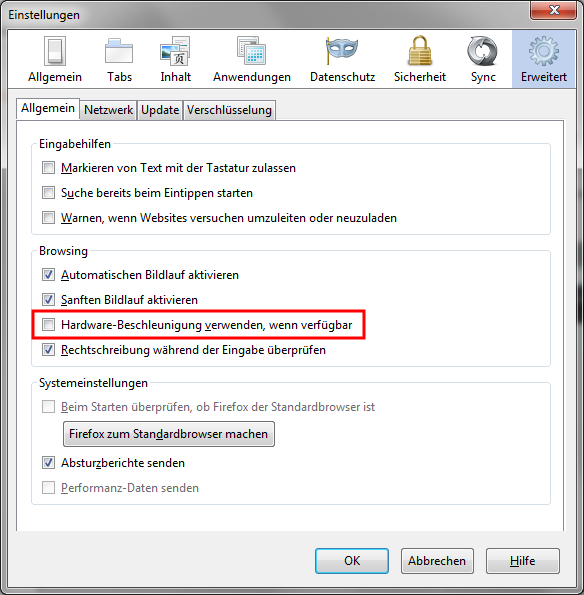
I can reproduce this problem on different workstations with different hardware and even on the newest non ESR Version of Firefox. But it is not reproducable in virtual machines. This is a serious problem, because it is impossible to work without the IBM support site. Our first workaround for this was to use Internetexplorer :-((. But now our PC support team has found out, that the problem is related to the hardware acceleration of Firefox. When you disable the hardware acceleration then the IBM site is working as expected again.
I can reproduce this problem on different workstations with different hardware and even on the newest non ESR Version of Firefox. But it is not reproducable in virtual machines. This is a serious problem, because it is impossible to work without the IBM support site. Our first workaround for this was to use Internetexplorer :-((. But now our PC support team has found out, that the problem is related to the hardware acceleration of Firefox. When you disable the hardware acceleration then the IBM site is working as expected again.
Sunday, March 31, 2013
Configure Domino to ignore whitespace during quota check.
When you have set quotas for your mail files on a server with transaction logging enabled (I really hope everyone has logging enabled.) your users have the problem, that after they have deleted some mails there is no possibility to remove the whitespace from the database, because the option to compact is not available for databases which are transaction log enabled*. So many admins run "compact -c" regulary on all mail files to remove whitespace. But from a performance point of view copy style compacts are a really bad idea (I will provide more infos on this in a future blog post).
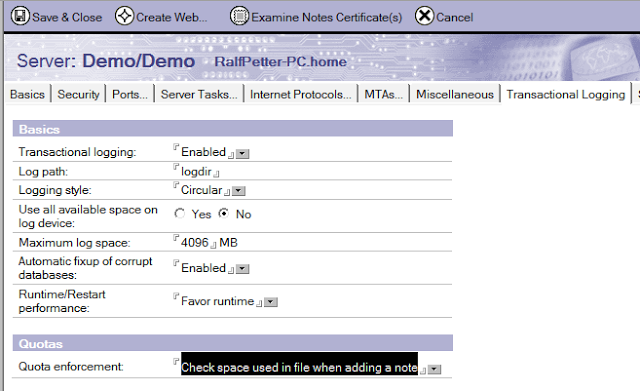
So the much better way to solve the problem is to change the "quota enforcement" setting on the "Transaction Logging" tab in your server document from the default "Check file size when extending the file" to "Check space used in file when adding a note". With this setting the white space is ignored on quota calculation and your users are happy again.
* The compact for user is disabled, because a copy style compact will generate a new DBIID and a change of the DBIID of a database make a new full backup of this database necessary.
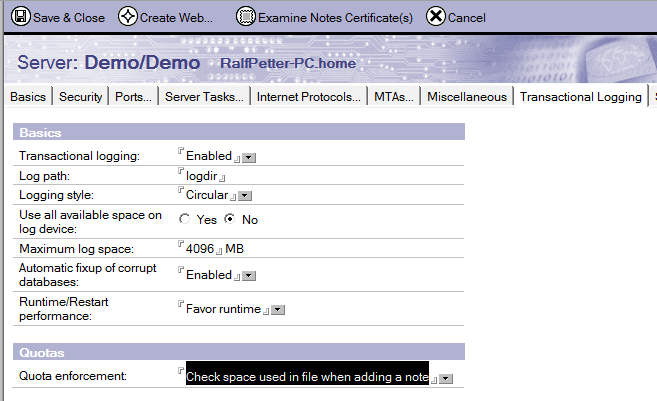
So the much better way to solve the problem is to change the "quota enforcement" setting on the "Transaction Logging" tab in your server document from the default "Check file size when extending the file" to "Check space used in file when adding a note". With this setting the white space is ignored on quota calculation and your users are happy again.
* The compact for user is disabled, because a copy style compact will generate a new DBIID and a change of the DBIID of a database make a new full backup of this database necessary.
Friday, March 29, 2013
Using contig.exe to analyze and remove fragmentation
The split of files in fragments can have serious impact on the performance of the Notes client or the Domino server. So it is very important to control the framgentation of the installation directory of Notes Domino and the data directories. The on board defrag tool of Windows is often not much help, because it can only defrag the whole harddisk and it cannot generate a report to show which file are fragmented and which are not. But Microsoft provides a tool which can analyze single files, directories or whole directory trees. It is called contig.exe. Contig.exe can be downloaded from http://technet.microsoft.com/en-us/sysinternals/bb897428.aspx.
The download contains one file (contig.exe) which should be extracted to a directory contained in the Windows path for example "c:\windows\system32". To analyze the fragmentation of the notesinstall directory you can use the following command line:
contig -a -v -s "c:\Program Files (x86)\ibm\Notes" > c:\temp\analyze.txt
-a only make an anaylze and do not defrag the files.
-v Verbose
-s Recursive subdirectorys
">c:\temp\anaylze.txt" write the report in the specified file.
The report contains for every file a entry with the count of fragments and a summary at the end:
....
Processing c:\Program Files (x86)\ibm\Notes\nlnotes.exe:
Scanning file...
[Cluster] Runlength
[0] 247
[2140] 150
[3400] 250
File size: 2759272 bytes
c:\Program Files (x86)\ibm\Notes\nlnotes.exe is in 3 fragments
------------------------
Summary:
Number of files processed : 22382
Average fragmentation : 10 frags/file
When you want to really defrag this files then remove the -a option and run the command again.
Contig.exe allows the use of wildcards to select files for defragmentation. So when you want to defrag all your nsf's in the Domino Data directory you can use:
contig -s "c:\Program Files (x86)\ibm\Domino\data\*.nsf"
The download contains one file (contig.exe) which should be extracted to a directory contained in the Windows path for example "c:\windows\system32". To analyze the fragmentation of the notesinstall directory you can use the following command line:
contig -a -v -s "c:\Program Files (x86)\ibm\Notes" > c:\temp\analyze.txt
-a only make an anaylze and do not defrag the files.
-v Verbose
-s Recursive subdirectorys
">c:\temp\anaylze.txt" write the report in the specified file.
The report contains for every file a entry with the count of fragments and a summary at the end:
....
Processing c:\Program Files (x86)\ibm\Notes\nlnotes.exe:
Scanning file...
[Cluster] Runlength
[0] 247
[2140] 150
[3400] 250
File size: 2759272 bytes
c:\Program Files (x86)\ibm\Notes\nlnotes.exe is in 3 fragments
------------------------
Summary:
Number of files processed : 22382
Average fragmentation : 10 frags/file
When you want to really defrag this files then remove the -a option and run the command again.
Contig.exe allows the use of wildcards to select files for defragmentation. So when you want to defrag all your nsf's in the Domino Data directory you can use:
contig -s "c:\Program Files (x86)\ibm\Domino\data\*.nsf"
Wednesday, March 27, 2013
My Top 5 Notes 9 features
There are so many nice improvements in Notes 9, that it was very difficult to choose my top 5, but here they are:
1. The new theme.
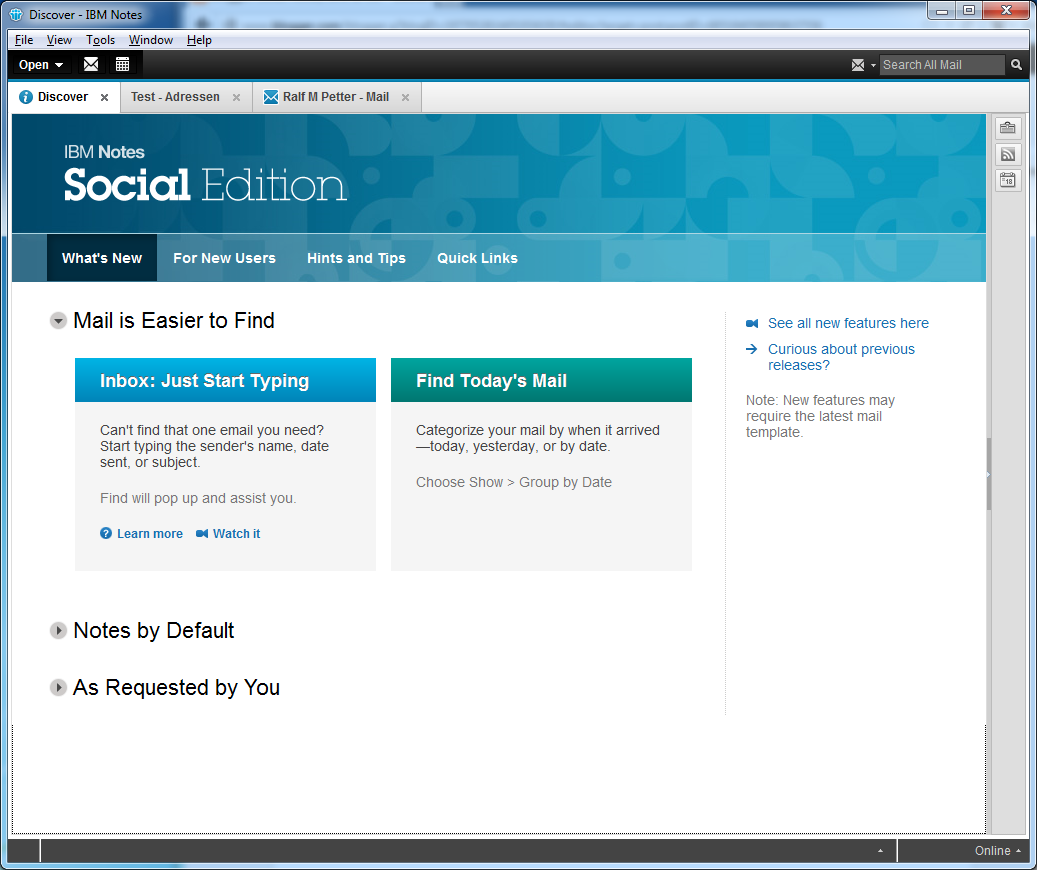
First i was a little worried, about the new grey colour palette and the reduced colours of the icons. But after a short while i really liked the new design and every time i have to go back to my 8.5.3 Notes client at work i think the old theme looks very dated.

1. The new theme.
First i was a little worried, about the new grey colour palette and the reduced colours of the icons. But after a short while i really liked the new design and every time i have to go back to my 8.5.3 Notes client at work i think the old theme looks very dated.
Tuesday, March 26, 2013
How to reports bugs in Notes 9 without a PMR?
Unfortunatly there are some nasty little bugs in Notes 9 and i am searching for an easy way to report this bugs to IBM Development. I do not want to open PMR's because they are to complicated for this little bugs. So does anyone know a way to report bugs like the following to the Development team:
The Typeahead in the new Quickfind dialog does not work, when the "TypeaheadShowServerFirst=1" notes.ini setting is present.
Without the notes.ini setting the typeahead works:
 With "TypeaheadShowServerFirst=1" set the typeahead fails:
The Typeahead in the new Quickfind dialog does not work, when the "TypeaheadShowServerFirst=1" notes.ini setting is present.
Without the notes.ini setting the typeahead works:
Friday, March 22, 2013
Notes 9 gold the first look is a little bit disappointing
Don't get me wrong, Notes 9 is a big progress over 8.5.3 and it is a good release, but many of the little rough edges i have already criticized in the beta are still in the final version. And this little UI quirks and inconsitences are this things which separate the good from the very good software products. This is especially disappointing because Scott Souder has promised, that significant improvements in this area will be made from beta to gold in a Q&A session at the Edcom Nachlese in munich.
So what are my main complaints about Notes 9 and why do i think that IBM should really work on this stuff.
Many important parts of Notes still look like software from the last century.
The first impression a user gets from the Notes Client is the password dialog. The password dialog has not changed since version 6. It looks like a Windows 2000 dialog and looks really foreign on Windows Vista upwards.

The window tdecoration does not use the style from windows and the dropdown boxes and push button are looking like we are running this software on a very old windows version. By the way all screenshots are from my Windows 7 computer.
And there are many other places with the same old dialogboxes. And i am not talking from seldom used dialogs. For example look at the "Open Application" dialog.
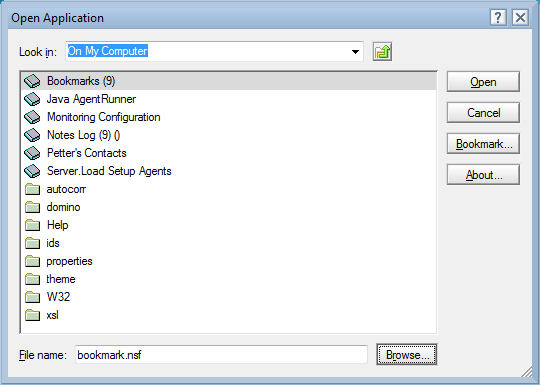
Again the icons are from Notes 6 or older and are complete different to the rest of the icons Notes 9 is using. The window decorators are complete wrong again becaue they are still from Windows 2000 and not fromWindows 7. And the funniest thing is that there is already a new designed "Open Application" dialog and new icons for Applications and folders in the product. This new dialog is used in the Designer client.
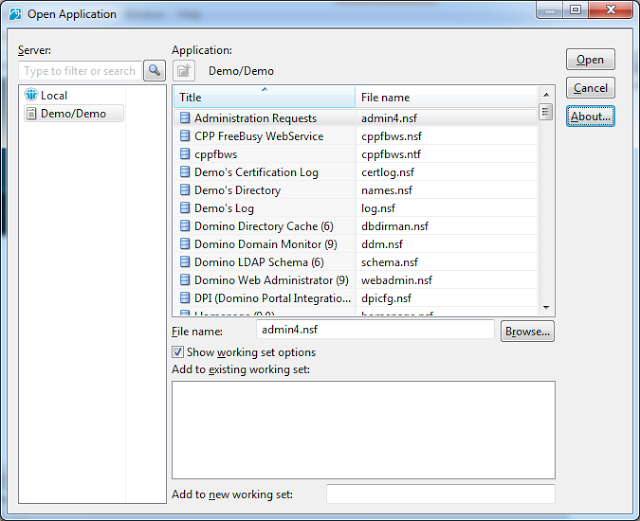
This dialog uses the correct window decorators. The widget set is from Windows 7 and the icons have a fresher look than the old icons in designer. Although there is still room for improvement in the designer dialog too, it would be a good replacement for the open dialog in the client.
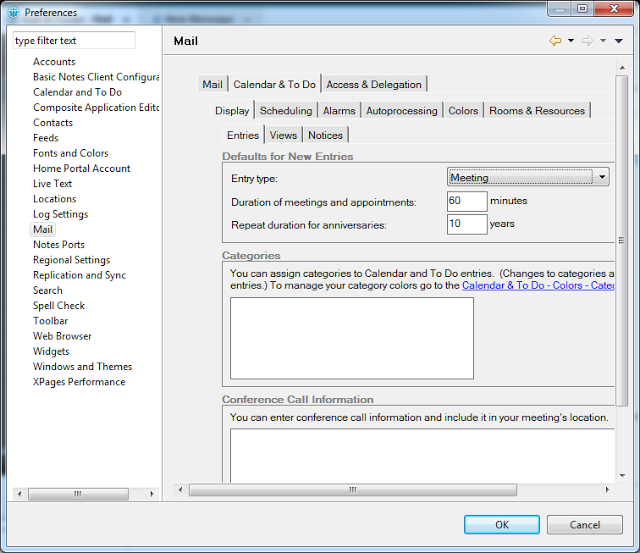
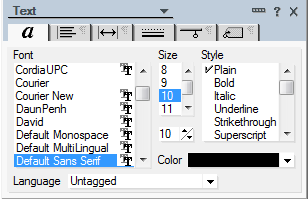
Or lets look at the preferences dialog. Is IBM really thinking that it is a good idea to put an old style notes dialog in an eclipse dialog with scrollbars? I do not think that this is the "exceptional experience" IBM is always promising.
And i can not imagine a reason why the properties dialogs are still not resizable and not redesigned in 2013. Every power user in our company is complaining that it is really ridiculous to use such small and somtimes bad designed dialogs when you want to change a text property or even worse a table property. And again IBM has already proofed that they can do it better with the property sidebars in the productivity editors (Oh if forgot they are discontinued and all my investment in them is gone with them).
So my question is, why has IBM redesigned the already good looking parts like the CA Views and the sidebar if there are still so many very old parts of the product?
The second problem in Notes 9 is that there are so many inconsistencies in the UI.
First of all, i do not know an other application which is using at minimum four different widget styles in one application. For example look at the buttons in Notes:




This mix from different widget styles in the same application is a big problem in Notes, because it looks really unprofessional.
And now an easy one to solve. Notes 9 gold uses still different icons for the same thing.
For example follow up flags in Java View, Dialog, Old View and iNotes. Three different icons for the same purpose in four different places.
 Or the application and doclinks (Notes client vs. iNotes)
 And unfortunatly there are behavior inconsistences all over the whole application.
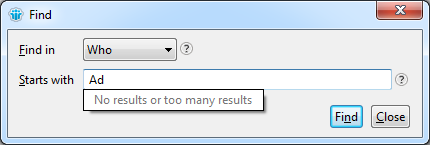
For example in the new find dialog (by the way, why is this dialog not resizable?) you get help by hovering over the question mark icons and in the mail preferences on the signature tab there is the same question mark icon, but there you have to click the icon to get the tooltip.
Or in the Notes Client you can find the open dialog in "File->Open->IBM Notes Application" and in the designer the same function is under "File->Application->Open". This and many more little differences in behavior make the Notes 9 unpleasant to use.
What is really annoying for customers which use many Eclipse plugins in the notes client is, that the IBM Development team has fogotten to adjust the colour palette in the Eclipse ui framework. So third party plugins look really alien with their blue colours compared to the new grey colour style used in the Notes 9 client.
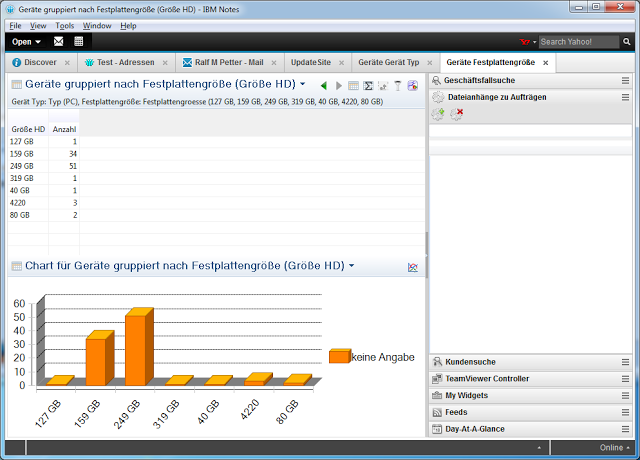
And this would be really easy to change for IBM. I have written a little patch to some of the Notes Client plugins which changes only a few lines of code and third party plugins will look much nicer in Notes 9.
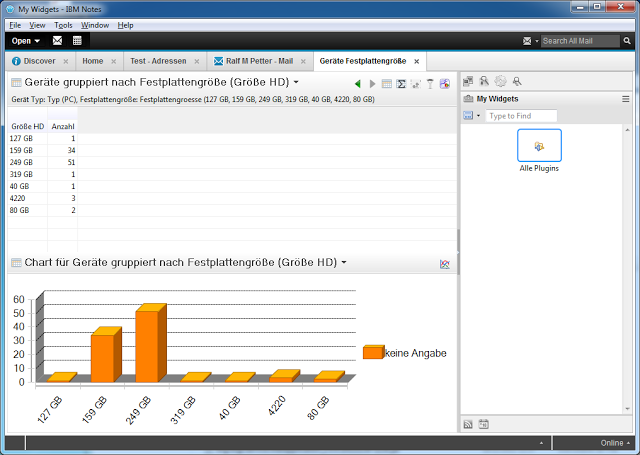
And this is not only a problem in thirdparty plugins . It looks like the same problem is in the Designer Client that some parts of the ui have still the old blue based colour palette.
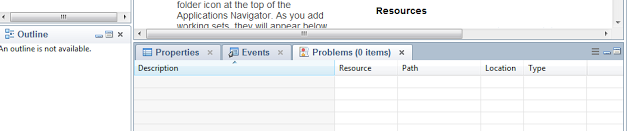
So the first look is unfortunately a little bit disappointing for me, but i know from the beta that there are many great improvements in the new version. I will show some of this feature in future blog posts.
So what are my main complaints about Notes 9 and why do i think that IBM should really work on this stuff.
Many important parts of Notes still look like software from the last century.
The first impression a user gets from the Notes Client is the password dialog. The password dialog has not changed since version 6. It looks like a Windows 2000 dialog and looks really foreign on Windows Vista upwards.
The window tdecoration does not use the style from windows and the dropdown boxes and push button are looking like we are running this software on a very old windows version. By the way all screenshots are from my Windows 7 computer.
And there are many other places with the same old dialogboxes. And i am not talking from seldom used dialogs. For example look at the "Open Application" dialog.
Again the icons are from Notes 6 or older and are complete different to the rest of the icons Notes 9 is using. The window decorators are complete wrong again becaue they are still from Windows 2000 and not fromWindows 7. And the funniest thing is that there is already a new designed "Open Application" dialog and new icons for Applications and folders in the product. This new dialog is used in the Designer client.
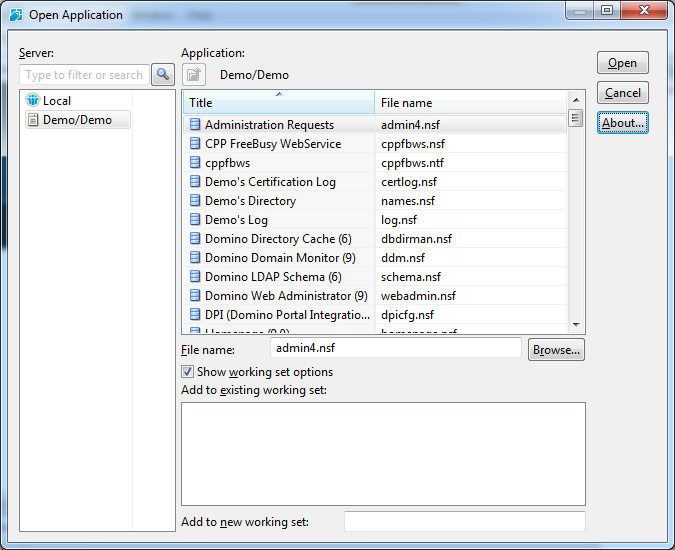
This dialog uses the correct window decorators. The widget set is from Windows 7 and the icons have a fresher look than the old icons in designer. Although there is still room for improvement in the designer dialog too, it would be a good replacement for the open dialog in the client.
Or lets look at the preferences dialog. Is IBM really thinking that it is a good idea to put an old style notes dialog in an eclipse dialog with scrollbars? I do not think that this is the "exceptional experience" IBM is always promising.

And i can not imagine a reason why the properties dialogs are still not resizable and not redesigned in 2013. Every power user in our company is complaining that it is really ridiculous to use such small and somtimes bad designed dialogs when you want to change a text property or even worse a table property. And again IBM has already proofed that they can do it better with the property sidebars in the productivity editors (Oh if forgot they are discontinued and all my investment in them is gone with them).
So my question is, why has IBM redesigned the already good looking parts like the CA Views and the sidebar if there are still so many very old parts of the product?
The second problem in Notes 9 is that there are so many inconsistencies in the UI.
First of all, i do not know an other application which is using at minimum four different widget styles in one application. For example look at the buttons in Notes:
This mix from different widget styles in the same application is a big problem in Notes, because it looks really unprofessional.
And now an easy one to solve. Notes 9 gold uses still different icons for the same thing.
For example follow up flags in Java View, Dialog, Old View and iNotes. Three different icons for the same purpose in four different places.
For example in the new find dialog (by the way, why is this dialog not resizable?) you get help by hovering over the question mark icons and in the mail preferences on the signature tab there is the same question mark icon, but there you have to click the icon to get the tooltip.
Or in the Notes Client you can find the open dialog in "File->Open->IBM Notes Application" and in the designer the same function is under "File->Application->Open". This and many more little differences in behavior make the Notes 9 unpleasant to use.
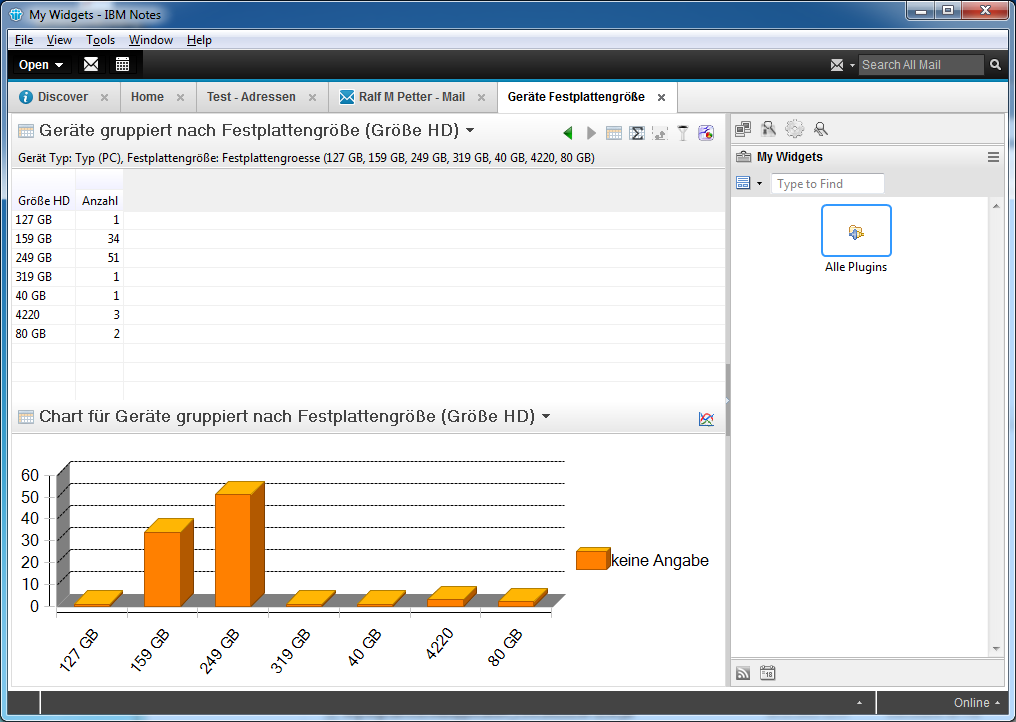
What is really annoying for customers which use many Eclipse plugins in the notes client is, that the IBM Development team has fogotten to adjust the colour palette in the Eclipse ui framework. So third party plugins look really alien with their blue colours compared to the new grey colour style used in the Notes 9 client.
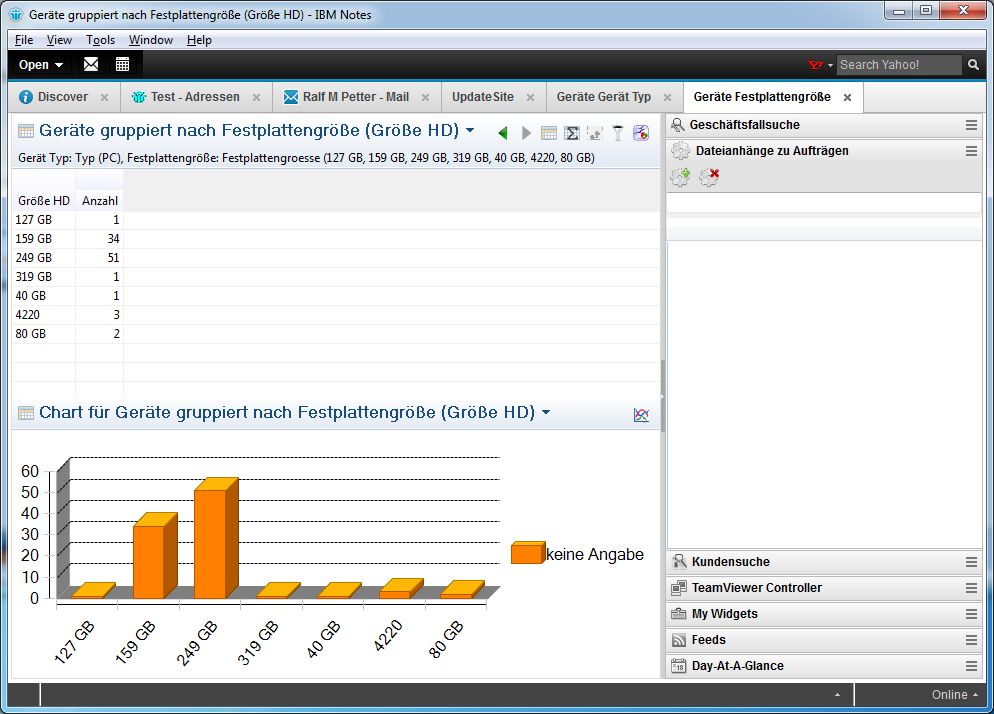
And this would be really easy to change for IBM. I have written a little patch to some of the Notes Client plugins which changes only a few lines of code and third party plugins will look much nicer in Notes 9.
And this is not only a problem in thirdparty plugins . It looks like the same problem is in the Designer Client that some parts of the ui have still the old blue based colour palette.

So the first look is unfortunately a little bit disappointing for me, but i know from the beta that there are many great improvements in the new version. I will show some of this feature in future blog posts.
Thursday, March 21, 2013
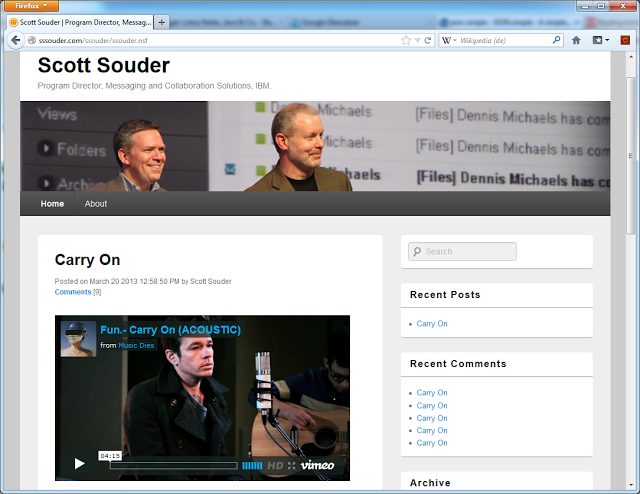
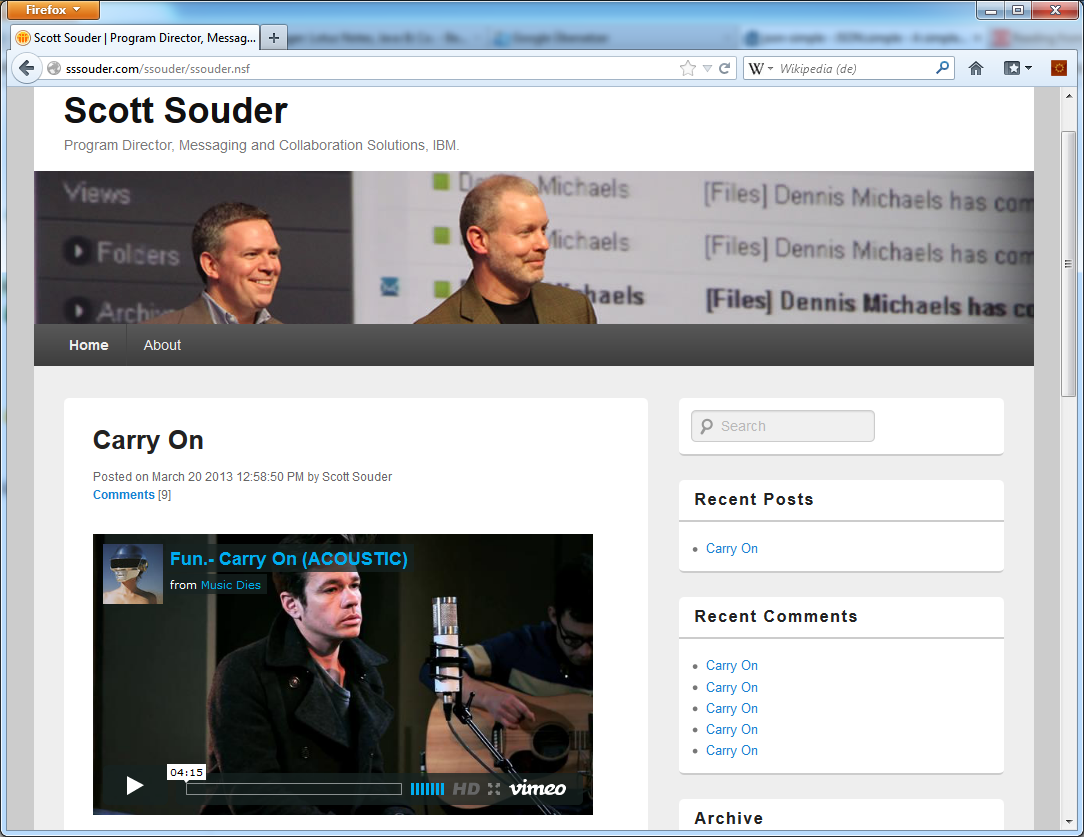
Scott Souder has started his blog.
Scott Souder the successor of ed brill in the IBM Messaging and Collaboration division has started his new blog on sssouder.com. I hope his blog will get as informative as the blog of ed brill which was one of the most valuable information source in the IBM collaboration bubble. So good luck to scott souder in his new role and with his new blog.
And by the way, the blog he is using runs on Domino and looks really well.
And by the way, the blog he is using runs on Domino and looks really well.
Subscribe to:
Posts (Atom)
ad