
Wednesday, April 17, 2013
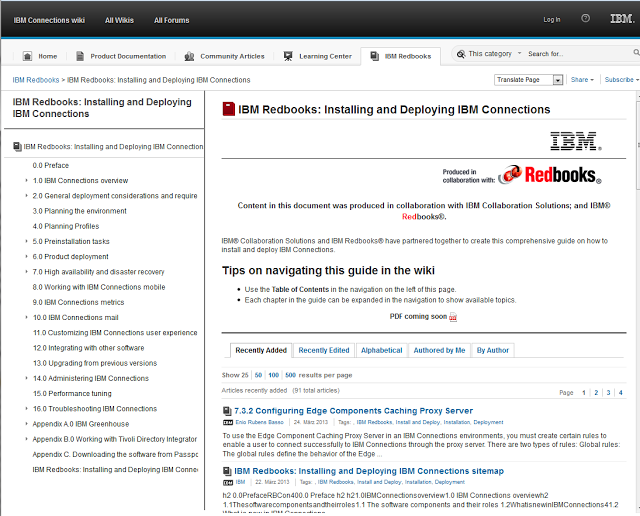
IBM Redbooks: Installing and Deploying IBM Connections
IBM has published a new redbook about the installation and configuration of IBM connections. Looks very promising.
Tuesday, April 16, 2013
Tabris a cool way to reuse your Notes/Eclipse RCP skills in the mobile app development
Today the final version of Tabris has been released. Tabris is a native peer client for a RAP (Remote Application Plattform formerly Rich Ajax Plattform) Server. RAP is a mature technology to run SWT/Jface Applications and Eclipse RCP Plugins on a server and render the UI to different clients like a webbrowser or native clients. The RAP Server and the Webclient are opensource. With the Tabris SDK they first commercial native client to RAP Server for Android and IOS is available. So you can reuse your existing SWT/Jface skills and build native apps for Android and IOS right like you are building Plugins for Notes today. Demos of the Tabris functionality are availabe on the google playstore. I think this is really a very cool technology and every Eclipse RCP developer should try this out.
Demos of RAP for Webclients

Demos of RAP for Webclients

Sunday, April 14, 2013
Improve your Domino Server Performance on the System i
On Windows it is pretty clear that Domino Servers only perform well, when the admin regulary defragment the file system where the Domino data is stored. Unfortunatly many System i admins do not know that fragmentation of Domino databases is a problem on their system too. So they do not get the best performance possible and with every year of using the server the problem of framgentation gets bigger and bigger.
The defragmentation of the disks in a System i Server can be done with the command STRDSKRGZ.
So login into your System i with a 5250 Terminal client and execute the STRDSKRGZ command:
The defragmentation of the disks in a System i Server can be done with the command STRDSKRGZ.
So login into your System i with a 5250 Terminal client and execute the STRDSKRGZ command:
Howto get auto generated values from rows created by SQL inserts in DB2
Normally you know exactly which values are in the columns of a newly inserted row in a database table. But when your table has an automatic generated identity column which is the primary key of the table you will want the automatic generated key value from your insert statement. But the normal insert command does not give back values. Fortunatly newer DB2 Version have the "Select from final Table" clause to solve the problem.
For example we have an address table created by the following commands:
CREATE TABLE PETTER/ADRESSEN (
"KEY" INTEGER GENERATED ALWAYS AS IDENTITY (
START WITH 1 INCREMENT BY 1
NO MINVALUE NO MAXVALUE
NO CYCLE NO ORDER
CACHE 20 ),
NAME1 CHAR(20) CCSID 273 NOT NULL ,
NAME2 CHAR(20) CCSID 273 NOT NULL ) ;
LABEL ON COLUMN PETTER/ADRESSEN
( "KEY" TEXT IS 'Primary Key' ,
NAME1 TEXT IS 'Name1' ,
NAME2 TEXT IS 'Name2' ) ;
And here is the code to add a row and get the automatic created identity number back in one step.
With the "Select from final table" clause you can retrieve values which are set by trigger prgograms or other advanced Db2 features too.
For example we have an address table created by the following commands:
CREATE TABLE PETTER/ADRESSEN (
"KEY" INTEGER GENERATED ALWAYS AS IDENTITY (
START WITH 1 INCREMENT BY 1
NO MINVALUE NO MAXVALUE
NO CYCLE NO ORDER
CACHE 20 ),
NAME1 CHAR(20) CCSID 273 NOT NULL ,
NAME2 CHAR(20) CCSID 273 NOT NULL ) ;
LABEL ON COLUMN PETTER/ADRESSEN
( "KEY" TEXT IS 'Primary Key' ,
NAME1 TEXT IS 'Name1' ,
NAME2 TEXT IS 'Name2' ) ;
And here is the code to add a row and get the automatic created identity number back in one step.
   PreparedStatement ps = con
     .prepareStatement("Select * from final table (Insert into petter/adressen( name1,name2) values('Ralf','Petter'))");
   ResultSet rs = ps.executeQuery();
   rs.next();
   System.out.println(rs.getBigDecimal(1));
With the "Select from final table" clause you can retrieve values which are set by trigger prgograms or other advanced Db2 features too.
Friday, April 12, 2013
The Art of Java performance tuning.
There was a very interesting session at Eclipse Con 2013 in Boston about low level java performance tuning from Ed Merks. You can find the session slides at: http://www.eclipsecon.org/2013/sites/eclipsecon.org.2013/files/JavaPerformanceTuning.pptx
P. S. The interesting slides start at slide 17.
P. S. The interesting slides start at slide 17.
Thursday, April 11, 2013
Happy Birthday to the best application server on earth
This year the best application server system celebrate its 25th birthday. Watch this video to see why the "IBM i" is is such a great system.
Howto split a String with a delimiter in SQL
Today i want to show how to split a String with a delimiter in SQL for example in a table with modelnumbers which consists of two parts sperated by a slash.
model
A1/44
CX3/2
C/140
To get the first and second part of the modelnumber you can use
select LEFT( trim(model),LENGTH(trim(model))-ABS(LOCATE('/',trim(model))-1)) model1, RIGHT( trim(model), LENGTH(trim(model))-LOCATE('/',trim(model))) model2 from modeltable
to get the result:
model1 model2
A1 44
CX3 2
C 140
model
A1/44
CX3/2
C/140
To get the first and second part of the modelnumber you can use
select LEFT( trim(model),LENGTH(trim(model))-ABS(LOCATE('/',trim(model))-1)) model1, RIGHT( trim(model), LENGTH(trim(model))-LOCATE('/',trim(model))) model2 from modeltable
to get the result:
model1 model2
A1 44
CX3 2
C 140
Wednesday, April 10, 2013
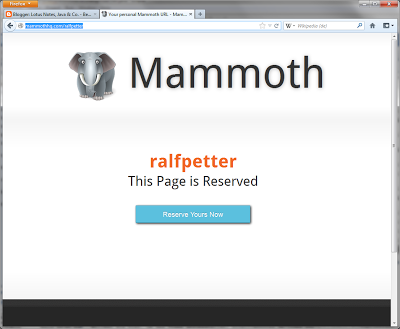
MammothHq The next social network?
I do not know if http://mammothhq.com/ralfpetter is the next big thing in the internet, but the registration is free and easy. So if you want you can try out with the above link.
Subscribe to:
Posts (Atom)
ad